HP Chromebook 14-SMB Battery Replacement
ID: 185035
Description: The battery is one of the easiest parts to...
Steps:
- Remove the eleven Phillips screws securing the lower case.
- Remove the two rubber stoppers, then remove the two Phillips screws hidden underneath.
- Flip the laptop over and open the lid.
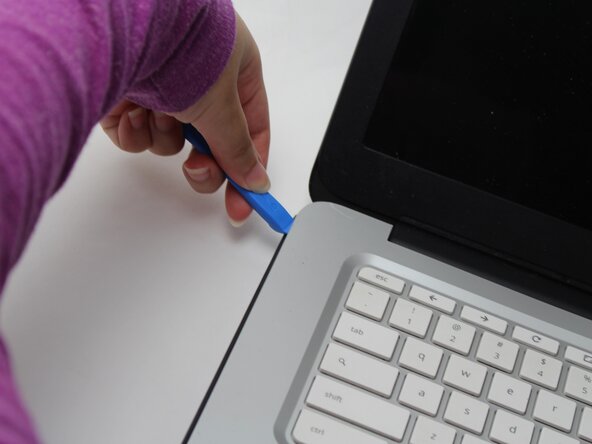
- Insert an opening pick into the seam between the keyboard assembly and chassis.
- Slide the pick along the edge to release the plastic clips, then use an opening tool to pry around the entire perimeter until the keyboard assembly fully releases.
- Do not pull the keyboard assembly fully away from the laptop yet; it is still connected by fragile ribbon cables.
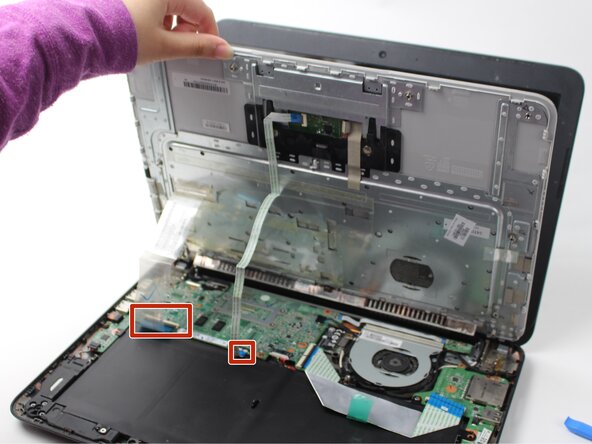
- Lift the keyboard perpendicular to the laptop.
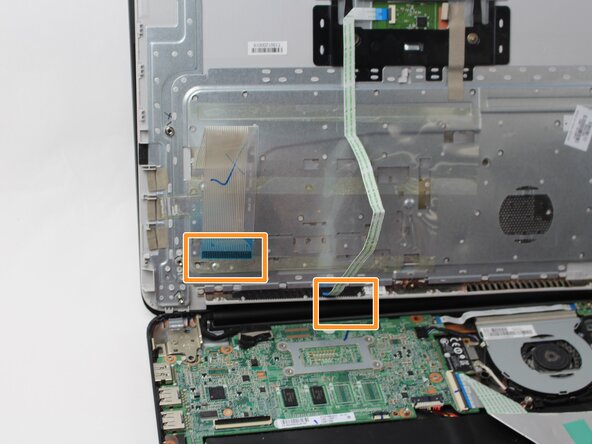
- Flip up each of the two black ZIF locking flaps that secure the keyboard and trackpad ribbon cables to their motherboard sockets.
- Disconnect the keyboard and trackpad ribbon cables.
- Remove the keyboard.
- Use your fingernail or the flat end of a spudger to gently disconnect the battery connector from its motherboard connector.
- Use a Phillips #0 screwdriver to remove the three screws that secure the battery.
- Lift the battery up and out of the chassis.
- Take care not to scratch or damage the battery. Lithium-Ion batteries can be dangerous if punctured.