Lenovo ThinkPad P50 Display Replacement
ID: 186147
Description: A cracked, flickering, or completely...
Steps:
- Slide the battery latch to the left to unlock it and remove the battery.
- Loosen the six 12.6 mm captive screws that secure the lower case with the Phillips #00 screwdriver.
- The screws will not come all the way out; do not attempt to remove them from the case.
- Pull up the notch with your fingernail or a spudger.
- Lift the lower case up and off of the chassis.
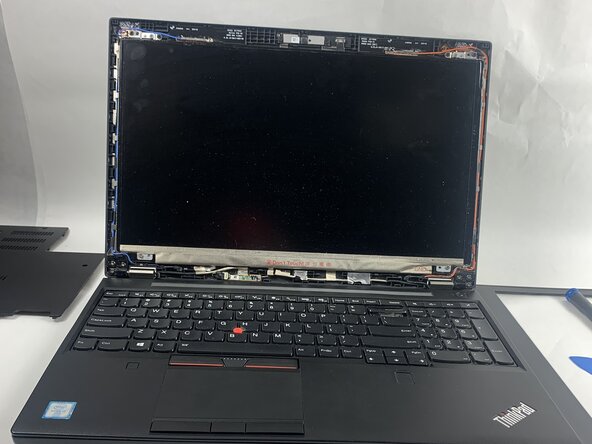
- Use an iFixit opening pick to carefully remove the plastic bezel from the front of the display.
- There are clips beneath the trim that need to be carefully detached.
- Avoid using metal tools, as they can damage the plastic components.
- Remove the four 2.5 mm screws located along the corners with a Phillips #00 screwdriver.
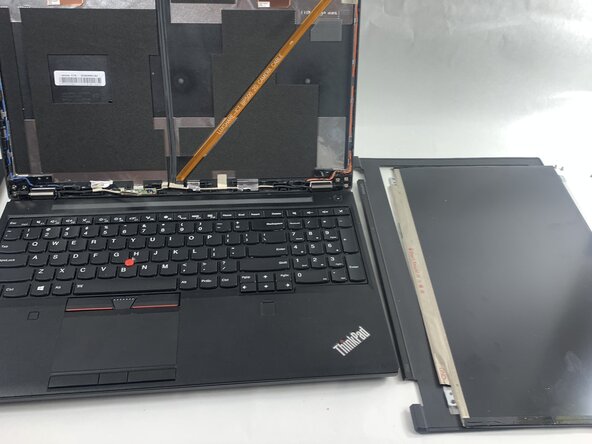
- Carefully tilt the screen forward and lay it face down on the keyboard, making sure not to strain or damage the cable still attached to it.
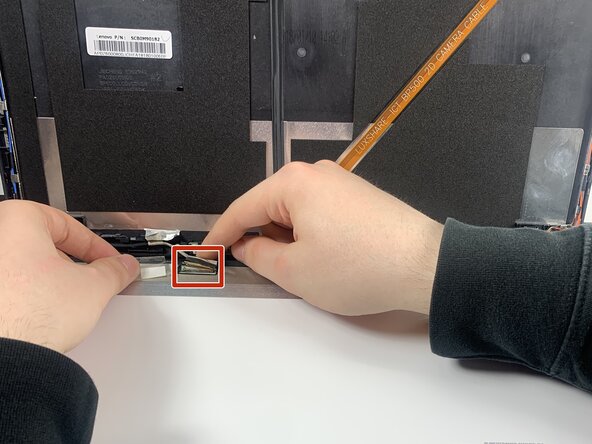
- Display (sometimes called eDP cables in laptops) and camera cable connectors often have a small metal buckle running around the socket, locking them in place. The connectors are typically wide and may have tape attached to the buckle.
- Gently push the tip of a spudger under the metal buckle to unclip it, then swing it over the socket.
- Hold the buckle and cable together and gently pull the connector straight out of its socket.