Microsoft Wireless Mouse RJN-00001 Disassembly
ID: 193726
Description: The scroll wheel of my mouse had a bad...
Steps:
- Remove the AAA battery and back cover.
- Insert a spudger into the seam of the top cover. Using a metal spudger may leave scratch marks, so you may choose your preferred tool.
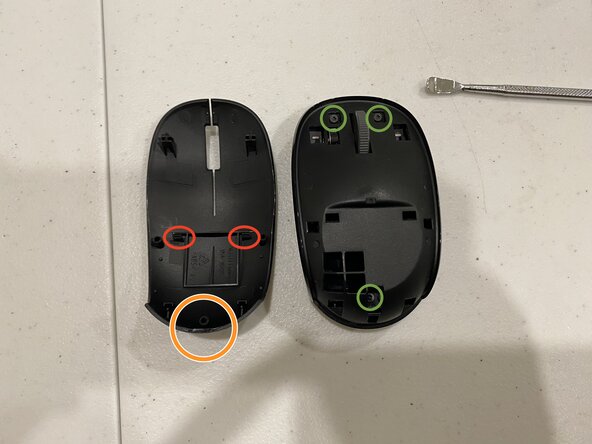
- In the image, you can see two clips on the top cover (marked with red circles). Use a spudger to release them, then lift the top cover. There is also a hidden clip at the rear that can be easily disengaged (marked with orange circles).
- After that, remove the three T5 screws (marked with green circles) to lift off the mid-frame.
- Remove the three Phillips screws, then carefully separate the motherboard from the scroll wheel to complete the disassembly.
- Measure the scroll wheel dimensions; you should be able to find the corresponding model online. I cleaned it using electronic contact cleaner, and the scroll wheel returned to normal. You can give this a try.
- Finally, measure the button dimensions for future reference.
- My English is not very good, so I used AI to translate this article into English. Please help correct any translation errors if there are mistakes.