Motorola Moto G Power 2022 Battery Replacement
ID: 199410
Description: This guide will show you how to replace the bat...
Steps:
- Power off the phone by holding the volume and power buttons simultaneously.
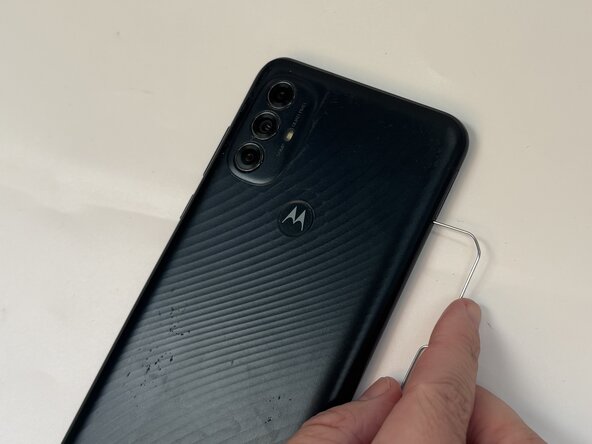
- Insert the end of a paperclip or a SIM card eject tool into the small hole to eject the SIM tray, then remove it.
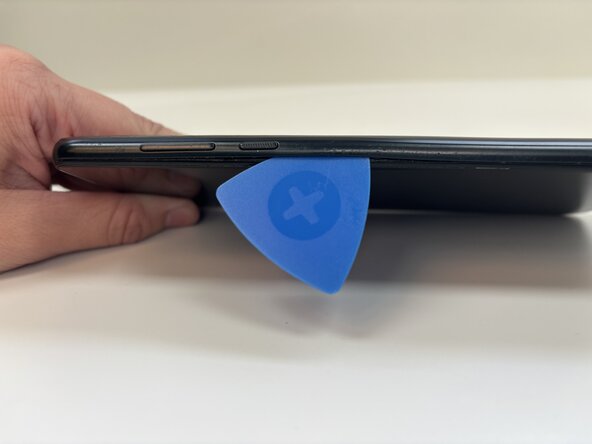
- Slide an opening pick around the perimeter of the phone to break through and loosen the adhesive holding the outer case in place.
- Use an opening tool to release the clips securing the front and back casing together.
- Don't remove the case yet!
- Use an iOpener for about 1-2 minutes to heat the adhesive on the Motorola logo so that it can be separated from the outer casing.
- Hold your finger on the Motorola logo (where the fingerprint sensor is) and gently remove the plastic outer casing.
- Set the outer case aside.
- Use a Torx T5 screwdriver to remove nineteen 3.9 mm screws from the midframe.
- Be careful not to lose them! They are very small.
- Remove the plastic motherboard cover.
- Place a spudger or an opening tool under the edge of the battery connector and pry straight up to disconnect it.
- Remove the battery cable using an opening pick or tweezers. It should pop right off.
- Slide a thin, ESD-safe pry tool or angled tweezers under the metal neck of the coaxial cable connector (as close to the head as possible) and lift straight up from the board.
- DO NOT spray the battery with isopropyl alcohol as shown in the image. This may damage your device.
- Apply 1-2 drops of high concentration (over 90%) isopropyl alcohol to the gaps in between the frame and the edges of the battery.
- Using too much alcohol can damage the display.
- Let the isopropyl alcohol sit for at least 60 seconds to allow the adhesive to soften.
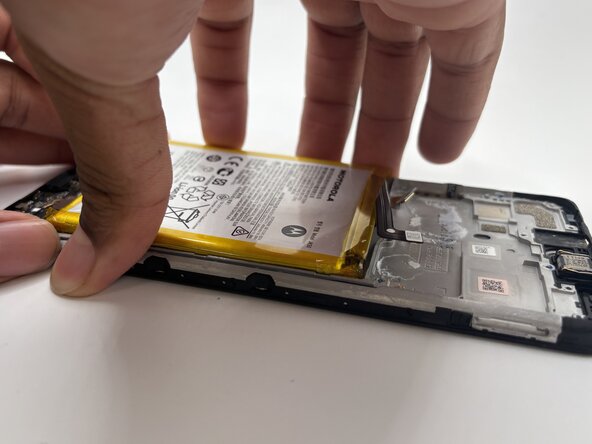
- Using an opening pick, pry off the battery from the metal frame.
- There is no pull tab, so this part can be tricky and may take several tries. Using a suction tool may help you remove the battery more easily if sliding the pick beneath the battery doesn't work.
- Gently remove the battery.