Sony Cybershot DSC-S750 Screen Replacement
ID: 199725
Description: This guide will walk you through the process of...
Steps:
- Remove all screws on the outer shell of the camera with a small Phillips head screwdriver.
- Now that the inner shell is exposed after unscrewing the outer shell, remove the screws from the inner shell of the camera.
- Remove the screw from the battery housing.
- This will allow you to remove the back of the camera which makes accessing the screen easier.
- Remove the ribbon cable that connects the screen to the battery.
- Remove the ribbon cable that is used to connect the LCD screen to the mother board.
- To ensure no damage is done when disconnecting the ribbon cables, pull carefully on the white plastic portions using a pair of tweezers.
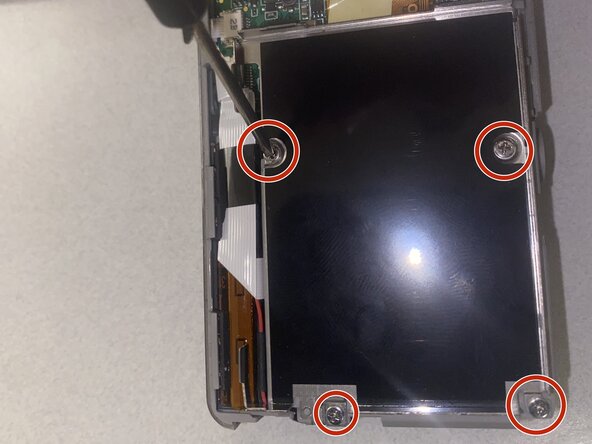
- Remove all the screws from the screen housing.
- Connect your new screen into the ribbon cable housing.
- When plugging in the new screen ensure that the black portion of the cable is flush and inserted carefully otherwise the screen will not display.