Framework Laptop 16 Expansion Bay Shell Fan Board Removal (Dual M.2 Adapter)
ID: 200053
Description:
Steps:
- Use the flat end of your Framework Screwdriver, or a clean fingernail, to lift up and release the locking tab on one of the fan ZIF connectors.
- Use your fingers to grip the brown pull tab and slide the fan cable straight out of its socket.
- Repeat the previous two steps to disconnect the other fan cable.
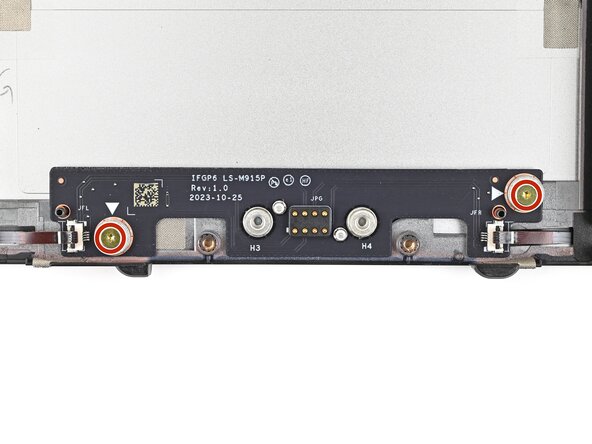
- Use your Framework Screwdriver to remove the two 3.6 mm‑long screws securing the Expansion Bay Shell Fan Board.
- Hold on to these screws—you'll use them to install the Dual M.2 Adapter.
- Use your fingers to lift the board straight off its alignment pegs on Expansion Bay Shell and remove it.