Google Pixel 10 Pro Fold Outer Screen Adhesive Installation
ID: 206889
Description:
Steps:
- Use a spudger, or your fingers, to remove the old outer screen adhesive on the frame.
- Use isopropyl alcohol (>90%) and a coffee filter or a microfiber cloth to remove any adhesive residue.
- Repeat the previous step for the adhesive on the outer screen.
- Before removing any liners, check if the outer screen adhesive matches the frame.
- The clear liner should face the frame.
- Peel away the top half of the new adhesive strip from its clear liner and keep the liner folded before continuing.
- Be careful during this step, as it's easy to stick the adhesive in the wrong spot. Take your time and work slowly.
- Align the top half of the adhesive over the frame, using the corners as reference points.
- Place the adhesive on the frame.
- Use the flat end of a spudger, or your fingers, to press down the top edge of the adhesive and adhere it to the frame.
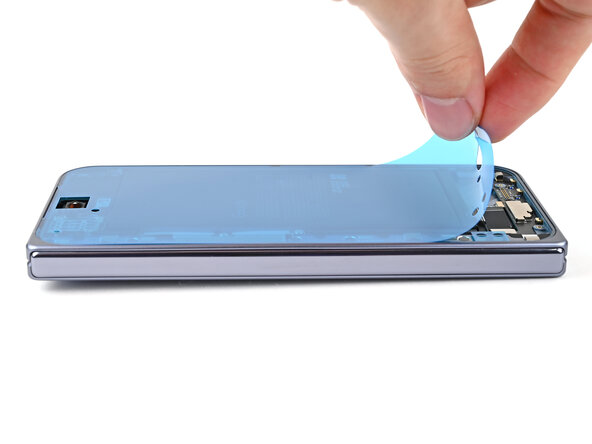
- While peeling away the rest of the clear liner, slowly lay the adhesive over the perimeter of the phone.
- Use the flat end of a spudger, or your fingers, to press down the rest of the adhesive and adhere it to the frame.
- Use the point of a spudger to pry up the segmented tab on the bottom edge of the large blue liner.
- Lift the tab and peel off the large blue liner to expose the secondary liner.
- If any of the adhesive starts to peel up with the liner, gently lay it back on the frame and use the flat end of a spudger to secure it to the frame.