HP Pavilion 15-cs0012cl SSD Replacement
ID: 212018
Description: This guide will walk you through removing the...
Steps:
- Remove the three 5.6 mm screws from the back of the laptop using a Phillips #0 screwdriver.
- Remove the two rubber feet at the top of the case.
- Remove the three 5.6mm hidden screws using a Phillips #0 screwdriver.
- Insert a plastic pick between the bottom cover and the laptop chassis.
- Slide the pick along the edges to detach the bottom cover, then lift it off.
- Remove the two 4.3 mm screws securing the battery using a Phillips #0 screwdriver.
- Lift the battery up and pull it away from the motherboard to remove it.
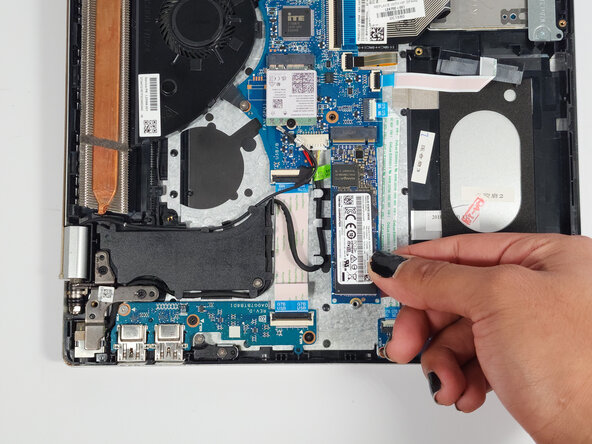
- Turn the laptop 90 degrees to the right for the best working angle.
- Use a Phillips #0 screwdriver to remove the 3.3 mm screw.
- Pull the SSD straight out of the slot to remove it.