2003-2007 Chevrolet Silverado Battery Replacement
ID: 212104
Description: Replacing a dead battery on a Chevrolet...
Steps:
- Pull the hood release latch to the left of the parking brake on the driver's side.
- Reach into the opening at the front of the truck and feel around until you locate the latch positioned near the center. Once you’ve found it, slide the latch to the right to release the hood, then lift the hood upward to open it.
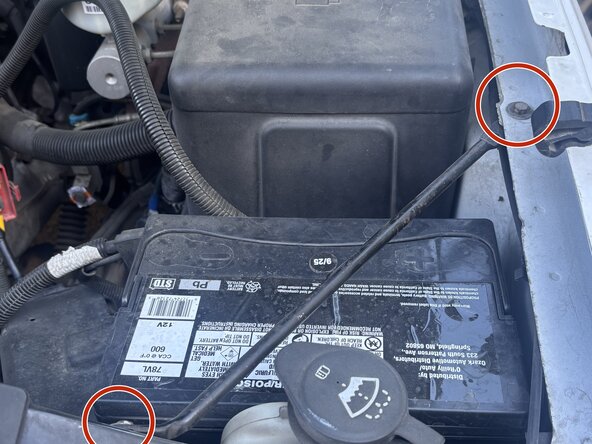
- Use a 10mm socket and a ratchet to loosen and remove the two bolts securing the battery brace to the truck’s body.
- Lift off the brace and place it aside.
- Use a socket wrench with a 6-inch (or longer) extension to loosen the 13 mm bolt securing the battery hold-down block, located at the back of the battery compartment.
- Remove both the bolt and the hold-down block.
- Disconnect the black negative cable first (and reconnect it last) to reduce the risk of creating a short to ground.
- Loosen the 7 mm bolt on the black negative terminal just enough to lift the connector off and remove the cable.
- Loosen the 7 mm bolt on the red positive terminal until the connector can be lifted off.
- Move the cables aside and secure it out of the way.
- Hold the battery firmly with both hands and slowly remove it from its compartment. Remember, batteries can be quite heavyso take care to lift it safely.