Anker Soundcore Select 3 A3172 Speaker Frame Replacement
ID: 213497
Description: There is a plastic frame underneath the cover...
Steps:
- Place the Jimmy and the metal spudger between the seal of the cover and rubber of the speaker to separate them.
- Avoid applying too much force when placing the Jimmy and metal spudger so you do not damage the rubber casing of the speaker.
- Slide the metal spudger around the perimeter of the case to loosen the glue.
- You will feel some resistance when following the edge since the case is glued down.
- Pull the cover away from the device to remove it.
- Use a Phillips #00 screwdriver to remove the eight 16.3 mm screws from the speaker frame.
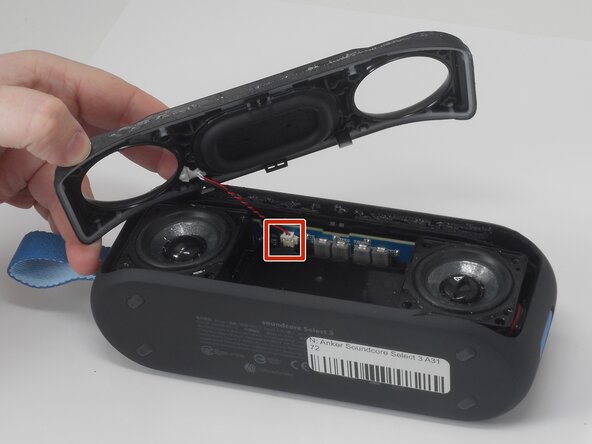
- Lift the speaker frame enough to access the microphone module JST connector attached to both the frame and a circuit board located between the drivers.
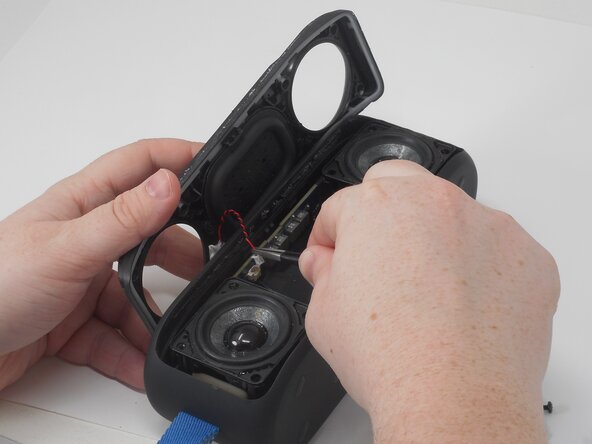
- Use a pair of tweezers to firmly grip the sides of the connector and pull straight away from the socket on the board.
- Hold the tweezers closer to the connector to get a better grip. If you're having trouble, try rocking the connector side-to-side to loosen it.
- Avoid pulling on the wires directly.
- Remove the frame.