Repairing a Damaged Lens Mount on a Canon AE-1 Program
ID: 219990
Description: If your Canon AE-1 Program lens and body cannot...
Steps:
- Push the silver release button on the lens.
- While holding the button, turn the lens clockwise until it becomes loose from the main body.
- Remove the lens, which should now be loose, and set it aside.
- Avoid forcing the lens. If it does not turn freely, make sure the release button is fully pressed.
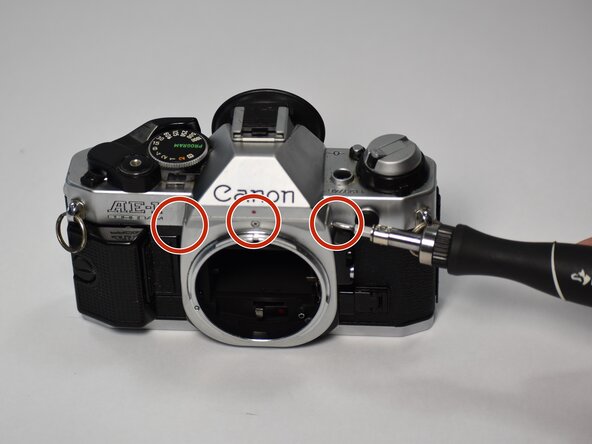
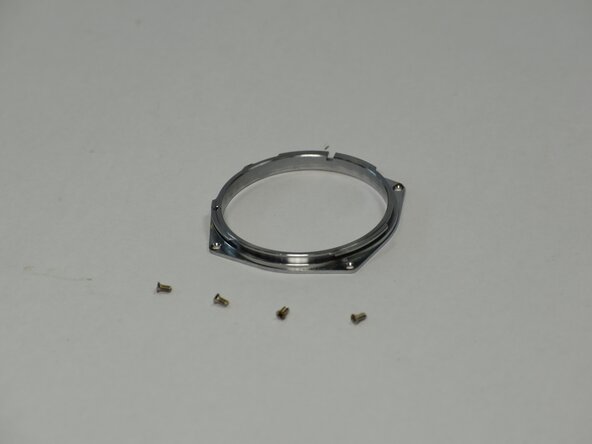
- Remove the 2mm Phillips-head screws on the lens mount bezel with a Phillips #00 screwdriver.
- There are 4 screws to remove. One on the front, one on the bottom, and one on each side of the bezel.
- Remember to remove the locking mechanism, this will be a small black piece to the right of the bezel.
- Remove the lens mount bezel.
- Watch out for a loose EM change pin
- Unscrew the 2mm Phillips-head screws on the lens mount with a Phillips #00 Screwdriver.
- There are 4 screws to remove. One at each corner.
- Using the lowest speed, take the dremel and carefully sand directly over the dent in the damaged lens mount until it is smooth.